
Why use Maven?
Maven support in CodeGrade AutoTest allows you to grade Java projects by running Maven’s standard testing lifecycle (i.e. mvn test) on each student submission.
In practical terms:
- Students submit a standard Maven project (including pom.xml)
- CodeGrade compiles the project using Maven
- Instructor-written JUnit tests are executed via Maven
- Test results are parsed automatically and displayed inside CodeGrade
This eliminates the need for custom Java compilation scripts, manual dependency handling, or fragile classpath configurations. Whether the assignment is a small multi-class exercise or a larger project with external libraries, Maven handles the build process in a predictable and industry-standard way.
The integration supports both simple and complex setups, including projects with multiple packages and dependencies. CodeGrade runs Maven in a controlled environment, ensuring that all students are graded under the same conditions.
Setup:
Setup includes:
- Installing Java and Maven in the AutoTest setup phase
- Uploading instructor-written JUnit test files
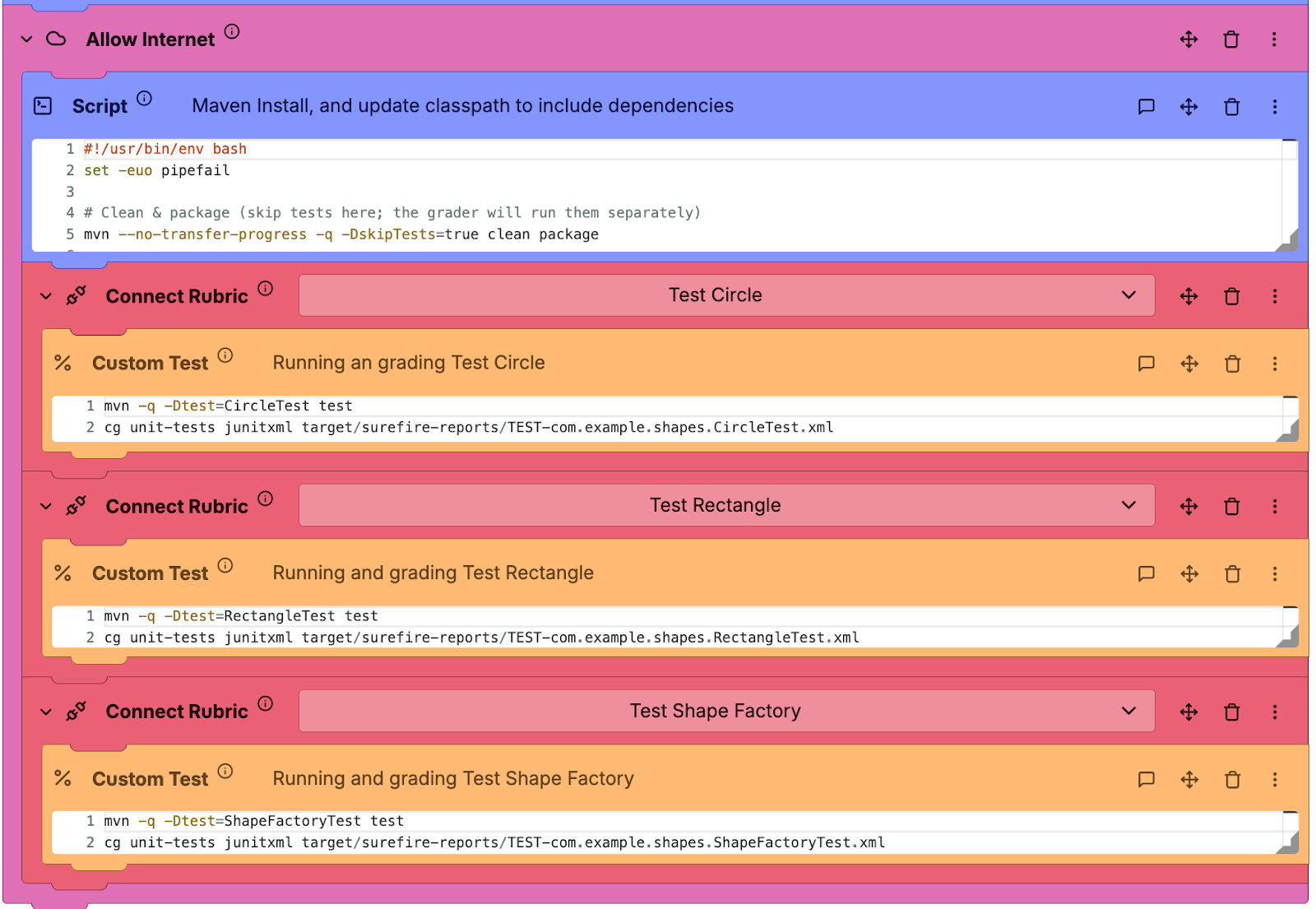
- Running Maven (mvn test) in one or more AutoTest blocks
CodeGrade provides ready-made setup scripts that install Java (e.g. Java 17), Maven, and required tooling in one step. Once configured, this setup can be reused across assignments or copied between courses.
You do not need to be a Maven expert to use this feature. The documentation walks you through each step, and our support team can review your setup before students submit to help prevent mid-semester surprises.
Learn more on how to automatically grade Java here!
Key benefits for instructors
- Grade real-world Java projects
With Maven, you can grade full Java projects rather than isolated .java files. Students follow the standard Maven directory structure, manage dependencies properly, and work in a way that mirrors professional Java development.
This makes assignments more authentic and better aligned with learning outcomes beyond syntax alone.
- Clear, structured feedback via JUnit
After Maven runs the tests, CodeGrade automatically parses the JUnit results and presents them in a clear, structured format for both instructors and students.
- Each test case shows whether it passed or failed
- Points can be assigned per test or test suite
- Failure messages and assertions are visible to students
This removes ambiguity from grading and helps students understand exactly what needs improvement.
- Modular tests and rubric alignment
Maven makes it natural to split assessment into multiple JUnit test classes (e.g. functionality, edge cases, performance). CodeGrade allows you to:
- Run each test suite separately
- Link each suite to a specific rubric category
- Assign points per category automatically
This supports transparent, criteria-based grading without manual intervention.
- Reduced opportunities for test bypassing
CodeGrade supports several safeguards to maintain fair grading:
- Instructor tests can remain hidden
- Hand-in requirements can block files such as *Test.java
- Maven runs in a controlled environment with consistent tooling
This makes it harder for students to tailor submissions to the tests themselves rather than solving the underlying problem.
- Consistency with professional Java practices
By grading with Maven, you reinforce industry-standard workflows: structured projects, dependency management, and automated testing.
Students gain experience with tools they are likely to encounter in internships and professional roles, while instructors benefit from Maven’s stability and widespread support.
Practical classroom example
Consider a Data Structures course with a Java Maze Solver project. Students implement multiple classes, such as maze representation, solver logic, and supporting utilities, possibly using external libraries.
Using Maven-based autograding:
- You provide a Maven project template
- Students implement their solution within src/main/java
- You upload comprehensive JUnit tests covering correctness, edge cases, and performance
- CodeGrade runs mvn test on every submission and reports results automatically
Each test suite can be mapped to a rubric category, and grading mirrors a real CI pipeline. You get consistent, repeatable results without manually running or inspecting each submission.
Getting started
To help you get started, we’ve prepared a detailed instructor guide covering:
- Java and Maven setup in AutoTest
- Structuring and uploading JUnit tests
- Mapping test results to rubric items
- Configuring hand-in requirements for fairness
If you’re new to Maven or AutoTest, the guide walks through each step. Our support team is also available to help review your configuration or run a pilot assignment before full deployment.
Looking for technical details?
For step-by-step setup instructions, example scripts, and advanced configuration options (including Maven installation, JUnit parsing, and rubric mapping), see our full technical guide: Grading Java assignments with Maven in CodeGrade.